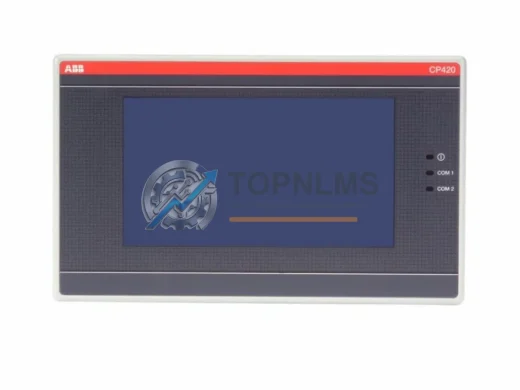
Product Overview
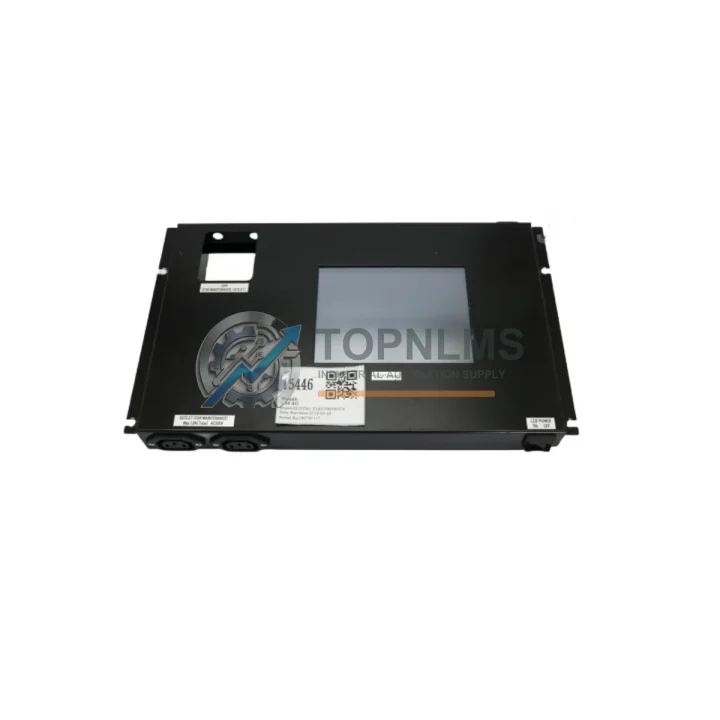
DIGITAL ELECTRONICS 31B0009-00 UF5310-2: Smooth Transition Upgrade for Legacy HMI Systems
The DIGITAL ELECTRONICS 31B0009-00 UF5310-2 is a proven HMI touch panel from the UF5310 Series, widely deployed across industrial control cabinets in manufacturing, process automation, and machine tool environments. As legacy HMI units age out of support cycles or suffer display failures, field engineers increasingly require a verified, drop-in replacement that preserves existing wiring harnesses, PLC communication links, and panel cutout dimensions — without forcing a full control system redesign.
This unit is stocked, tested, and ready to ship from our Xiamen warehouse. Whether you are replacing a failed panel on a production line or proactively building a spare-parts inventory for a fleet of machines running the UF5310 platform, the 31B0009-00 UF5310-2 delivers the compatibility and reliability your operation demands.
Compatibility Comparison Table
| Parameter |
Legacy / Outgoing Unit |
31B0009-00 UF5310-2 (This Unit) |
| Series |
UF5310 (earlier revisions) |
UF5310 Series — direct series match |
| Display Type |
TFT Color Touch Panel |
TFT Color Touch Panel — identical interface |
| Panel Cutout |
Standard UF5310 cutout |
Same cutout dimensions — no cabinet modification required |
| Wiring / Connector |
Existing harness connectors |
Compatible connector pinout — reuse existing wiring |
| Communication Protocols |
RS-232C / RS-422 / RS-485 |
RS-232C / RS-422 / RS-485 — full protocol compatibility |
| PLC Connectivity |
Mitsubishi, Omron, Siemens, Keyence, Panasonic PLCs |
Same multi-brand PLC driver library supported |
| Power Supply |
24 VDC |
24 VDC — no power circuit changes needed |
| Screen Project Transfer |
UF5310 project files |
Compatible — existing screen projects transferable |
| Installation Method |
Panel-mount, front-access |
Panel-mount, front-access — identical installation |
| Replacement Recommendation |
Direct drop-in replacement; no hardware or software redesign required in most applications |
| Warranty |
— |
12-Month Warranty from shipment date |
Seamless Upgrade Solutions
A successful HMI migration rarely involves the display panel alone. When replacing the 31B0009-00 UF5310-2 in an existing control cabinet, engineers typically review the full communication chain and power distribution architecture. The RS-232C or RS-485 link between the UF5310-2 and the host PLC — whether a Mitsubishi FX3U series CPU module, an Omron CP1H programmable controller, or a Keyence KV-5500 CPU unit — must be verified for baud rate, parity, and station address settings before commissioning the replacement panel.
In cabinets where the original wiring used a DB9 to terminal block adapter or a RS-232C/RS-485 signal converter, these components can typically be reused without modification. If the installation involves a multi-drop RS-485 network connecting several operator panels to a single PLC, a RS-485 repeater or signal isolator may already be present in the cabinet — this infrastructure remains fully compatible with the UF5310-2.
Power distribution to the HMI is typically sourced from a 24 VDC DIN-rail power supply module already present in the control cabinet. No changes to the power rail are required. If the cabinet also houses a Mitsubishi Q series or iQ-R series base unit with I/O expansion modules, the UF5310-2 communicates with the CPU via the existing serial or Ethernet link without requiring additional interface cards.
For sites performing a broader control system refresh, the UF5310-2 is frequently deployed alongside Panasonic FP-X series compact PLCs and Omron CJ2M CPU modules, both of which are supported natively in the UF5310 driver library. Engineers migrating from older DIGITAL ELECTRONICS UF Series panels — such as the UF5B or UF8 — will find that existing screen project files created in the Pro-face GP-Pro EX environment can be adapted for the UF5310-2 with minimal rework, significantly reducing engineering hours during the retrofit.
Where the original installation included a programming cable (USB-to-serial or RS-232C type) for screen data transfer, the same cable type is compatible with the UF5310-2, eliminating the need to source new tooling for the commissioning process.
Retrofit Guidance FAQ
Q: Can I reuse the existing wiring harness when replacing the old UF5310 panel?
A: Yes. The 31B0009-00 UF5310-2 uses the same connector layout and pinout as other UF5310 Series units. In the vast majority of installations, the existing wiring harness can be reconnected directly without modification. Always verify connector orientation and pin assignments against the wiring diagram before powering up.
Q: Do I need to reprogram the PLC when installing this replacement HMI?
A: No PLC program changes are required. The UF5310-2 communicates with the host PLC using the same protocol, baud rate, and station address as the original unit. Only the HMI screen project needs to be transferred to the new panel using the standard Pro-face programming tool.
Q: Which communication protocols does the UF5310-2 support?
A: The unit supports RS-232C, RS-422, and RS-485 serial communication, covering the majority of legacy PLC communication interfaces. Ethernet connectivity availability depends on the specific hardware revision — please confirm with our technical team if Ethernet is required for your application.
Q: Will the replacement panel fit the existing cabinet cutout?
A: Yes. The UF5310-2 conforms to the standard UF5310 Series panel cutout dimensions. No cabinet modification, drilling, or re-gasketing is required for a like-for-like replacement.
Q: How do I transfer the existing screen project to the new panel?
A: Connect the programming cable (RS-232C or USB-to-serial type) from your engineering PC to the panel’s programming port. Use the Pro-face GP-Pro EX software to download the existing project file to the new unit. The process typically takes less than 10 minutes and does not require PLC downtime.
Q: What if the original unit had a different firmware version?
A: Minor firmware differences between UF5310 revisions are generally transparent to the screen project and PLC communication. If a specific firmware version is required for compatibility with your screen project, contact our technical team prior to ordering and we will confirm the firmware revision of the unit in stock.
Warranty Assurance
Every DIGITAL ELECTRONICS 31B0009-00 UF5310-2 unit shipped from TOPNLMS carries a 12-month warranty from the date of shipment. Prior to dispatch, each unit undergoes a functional power-on test and visual inspection to verify display integrity, touch response, and communication port condition. Units that do not pass inspection are not shipped.
In the event of a warranty claim, our after-sales team responds within one business day. Defective units are eligible for replacement or repair at no additional cost within the warranty period, subject to confirmation that the fault is not attributable to installation error, overvoltage, or physical damage. Warranty coverage applies to the unit itself and does not cover consumable components such as backlight assemblies where wear is expected over extended operating hours.
For procurement teams managing planned maintenance schedules or building strategic spare-parts inventories, we offer multi-unit pricing and can reserve stock against a purchase order. Lead time for stocked units is typically 3–7 business days for international shipment via DHL Express or FedEx International Priority, with tracking provided at the time of dispatch.
For technical pre-sales questions, compatibility confirmation, or after-sales support, contact our team directly:
📧 [email protected] | 📞 +86 18359293191