Product Overview
Alcatel-Lucent OS9600/OS9700-CMM Replacement Solution: Seamless Transition from Legacy OmniSwitch Systems
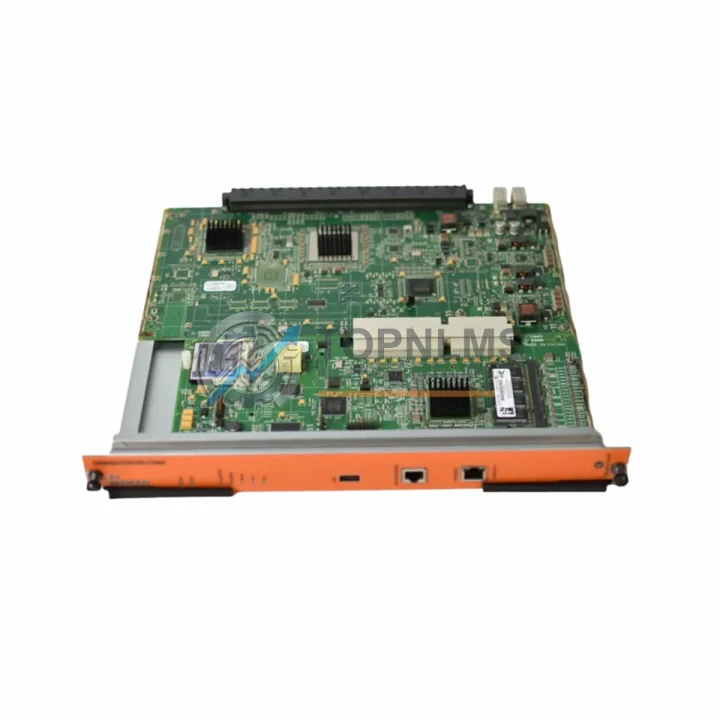
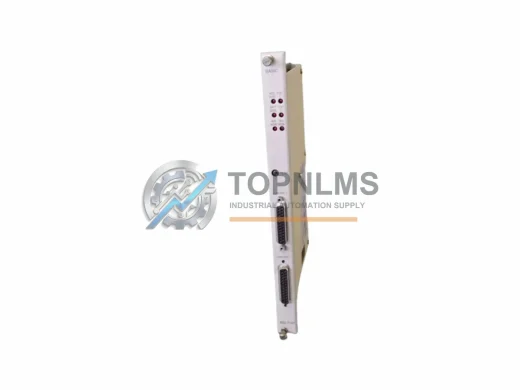
The Alcatel-Lucent OS9600/OS9700-CMM Chassis Management Module serves as the central control and supervisory brain of the OmniSwitch OS9600 and OS9700 modular chassis platforms. As these systems approach or have passed their end-of-life (EOL) milestone, network engineers and industrial automation teams face increasing pressure to source verified replacement units that maintain full backward compatibility with existing wiring, slot configurations, power infrastructure, and management software. TOPNLMS stocks tested OS9600/OS9700-CMM units ready for immediate dispatch, enabling your team to execute a controlled, low-risk migration without redesigning the surrounding chassis architecture.
The OS9600/OS9700-CMM manages all critical supervisory functions within the chassis: it handles system initialization, module discovery, redundancy switchover, and real-time health monitoring for every line card installed in the OS9600 or OS9700 backplane. When the primary CMM fails or becomes unreliable, the entire chassis—including all installed Ethernet switching modules, fabric modules, and power supply units—becomes operationally compromised. A direct CMM replacement restores full chassis management capability without requiring any changes to the installed line cards, cabling plant, or upstream network topology.
For sites running dual-CMM redundancy configurations, the OS9600/OS9700-CMM replacement integrates directly into the secondary CMM slot, allowing hot-standby failover to be re-established within minutes of installation. Engineers familiar with the AOS (Alcatel-Lucent Operating System) CLI will find that configuration files, SNMP community strings, and management VLAN assignments transfer seamlessly from the failed unit to the replacement module, provided the chassis NVRAMand flash partitions remain intact on the surviving CMM or are restored from backup.
During the replacement process, teams typically also audit adjacent components within the same chassis. The OS9600-GNI-C24 and OS9700-GNI-U12 Gigabit Ethernet line cards, for example, remain fully operational under the replacement CMM without firmware re-flashing in most AOS release branches. Similarly, the OS9600-XNI-U2 10-Gigabit uplink modules and the OS9700-BPS-550W-D backup power supply units continue to function under the new CMM’s supervisory control, preserving the investment in existing chassis hardware. If your site also operates OS6850E or OS6860 stackable switches connected to the OS9700 chassis via uplink trunks, those inter-switch links and LACP configurations are unaffected by the CMM swap, as the replacement module inherits the same chassis MAC address and management identity after proper initialization.
For facilities that are executing a broader network modernization—migrating from the OS9600/OS9700 generation toward the OmniSwitch OS9900 or OS6900 series—the OS9600/OS9700-CMM replacement unit provides a cost-effective bridge strategy. Rather than immediately decommissioning the entire chassis, engineering teams can stabilize the existing OS9600 or OS9700 platform with a verified CMM replacement, extend its operational life by 12–36 months, and phase in the newer OS9900-CMM or OS6900-X72 chassis in parallel. This staged migration approach reduces capital expenditure concentration, allows staff training on the new platform without production pressure, and maintains service continuity for connected industrial control systems, SCADA networks, or building automation backbones that depend on the OmniSwitch chassis for Layer 2/3 switching.
Physical installation of the replacement OS9600/OS9700-CMM follows the standard hot-swap procedure documented in the OmniSwitch Hardware Users Guide. The module slides into the dedicated CMM bay on the OS9600 or OS9700 chassis mid-plane, secured by the captive thumbscrews. Power draw is supplied directly from the chassis backplane; no external power cabling is required. The management console port (RJ-45 RS-232) and the 10/100 Ethernet management port on the CMM faceplate connect to your out-of-band management network using the same cable types and IP addressing scheme as the original unit. No changes to the chassis power supply modules—whether OS9600-PS-550W-AC or OS9700-PS-900W-AC variants—are necessary.
Compatibility Comparison Table
| Parameter |
Original OS9600/OS9700-CMM |
TOPNLMS Replacement Unit |
| Compatible Chassis |
OmniSwitch OS9600, OS9700 |
OmniSwitch OS9600, OS9700 (direct fit) |
| Form Factor / Slot |
Dedicated CMM bay, mid-plane connector |
Identical form factor, same mid-plane pinout |
| Management Interfaces |
RJ-45 Console (RS-232), 10/100 Ethernet Mgmt |
Same — no adapter required |
| AOS Software Compatibility |
AOS 6.x release branches |
Compatible with same AOS 6.x branches |
| Redundancy Support |
Dual-CMM hot-standby failover |
Full dual-CMM redundancy supported |
| Power Source |
Chassis backplane (no external cable) |
Chassis backplane (no external cable) |
| Installation Method |
Hot-swap, captive thumbscrews |
Hot-swap, captive thumbscrews |
| SNMP / CLI Config Transfer |
Manual restore from backup |
Same procedure — no additional steps |
| Replacement Recommendation |
EOL / End-of-Support |
Direct drop-in replacement — recommended |
| Warranty |
OEM warranty expired (EOL) |
12-Month TOPNLMS Warranty |
Seamless Upgrade Solutions
A successful OS9600/OS9700-CMM replacement rarely occurs in isolation. During the same maintenance window, engineering teams commonly inspect and, where necessary, replace or upgrade adjacent chassis components to ensure the entire platform returns to full operational health. The OS9600-GNI-C24 24-port Gigabit Ethernet copper line card and the OS9700-GNI-U12 12-port Gigabit SFP uplink module are the most frequently co-serviced components, as their firmware and operational state are tightly coupled to the CMM’s supervisory functions. If the chassis has been running with a degraded CMM for an extended period, it is prudent to verify the health of the OS9600-XNI-U2 10-Gigabit uplink modules as well, since CMM instability can occasionally cause incomplete module initialization logs that mask underlying line card issues.
Power integrity is another critical checkpoint. The OS9600-PS-550W-AC and OS9700-PS-900W-AC power supply modules should be inspected for fan health and output voltage stability before the replacement CMM is brought online. A marginal power supply that was masked by the previous CMM’s fault-tolerant behavior may surface as a new alarm once the replacement unit begins accurate health reporting. For chassis operating in high-availability environments, ensuring that both power supply bays are populated with verified units eliminates a common single point of failure that is often discovered during CMM replacement projects.
Out-of-band management infrastructure also deserves attention during the migration. The replacement OS9600/OS9700-CMM’s RJ-45 console port connects to your terminal server or console switch using a standard Cisco-compatible rollover cable, and the 10/100 management Ethernet port integrates into your dedicated management VLAN without requiring changes to upstream switches such as the OS6850E-24 or OS6860-U28 that may serve as management network aggregation points. If your site uses an OmniVista 2500 or OmniVista 9000 network management system, the replacement CMM is discovered automatically once its management IP address is restored, and all previously configured device profiles, topology maps, and SNMP trap destinations are re-associated without manual re-entry.
Retrofit Guidance FAQ
Q: Will the replacement CMM require a firmware upgrade before it can manage my existing line cards?
A: In most cases, no. TOPNLMS replacement units are tested and shipped with a stable AOS 6.x firmware version. If your chassis is running a specific AOS micro-release, the CMM firmware can be upgraded via the standard AOS image download procedure using the management Ethernet port or USB, without requiring the chassis to be taken offline.
Q: Can I replace the CMM while the chassis is powered and passing traffic?
A: Yes, if your chassis is configured for dual-CMM redundancy and the secondary CMM slot is populated with a functioning unit. The failed primary CMM can be removed and the replacement inserted while the secondary CMM maintains chassis control. For single-CMM configurations, a brief service interruption is required during the swap.
Q: Will my existing console and management Ethernet cabling connect directly to the replacement CMM?
A: Yes. The replacement OS9600/OS9700-CMM uses the same RJ-45 console (RS-232) and 10/100 Ethernet management port layout as the original. No adapters, gender changers, or cable modifications are required.
Q: How do I restore my configuration after installing the replacement CMM?
A: If a secondary CMM is present and was synchronized before the failure, configuration is automatically available. For single-CMM sites, restore the boot.cfg and related configuration files from your most recent backup using the AOS file transfer utilities via the management port or USB flash drive.
Q: Is the replacement CMM compatible with OmniVista network management systems?
A: Yes. Once the replacement CMM is online with the correct management IP address, OmniVista 2500 and OmniVista 9000 will rediscover the chassis automatically and restore all previously configured management associations.
Q: What if my chassis is running a mix of OS9600 and OS9700 line cards?
A: The OS9600/OS9700-CMM is designed to manage the specific chassis it is installed in. Ensure you are installing the correct CMM variant for your chassis model. Contact TOPNLMS with your chassis serial number if you need confirmation before ordering.
Warranty Assurance
Every OS9600/OS9700-CMM unit shipped by TOPNLMS is covered by a 12-month warranty from the date of delivery. Prior to dispatch, each unit undergoes a multi-point functional test that verifies power-on initialization, management port connectivity, mid-plane connector integrity, and basic AOS boot sequence completion. Units that do not pass all test criteria are quarantined and not offered for sale.
If a warranty claim arises within the 12-month coverage period, TOPNLMS will arrange a replacement unit dispatch or issue a full refund, depending on stock availability and customer preference. Our after-sales response target is one business day for warranty inquiries received via email or phone. Customers are not required to return the defective unit before a replacement is dispatched for verified warranty cases, minimizing additional downtime exposure.
For procurement teams requiring documentation, TOPNLMS can provide a test report, packing list, and commercial invoice with each shipment. Export documentation for cross-border shipments from Xiamen, China is prepared in compliance with applicable customs regulations, and HS code classification is provided on all commercial invoices to facilitate smooth customs clearance.
Stock availability is updated regularly. For urgent requirements or bulk procurement inquiries, contact our sales team directly to confirm lead time and reserve units before placing a formal purchase order.