Product Overview
Schneider Electric TSXCUSB485 Original Industrial Spare TSX Premium Compatible: System Stability & Maintenance Value
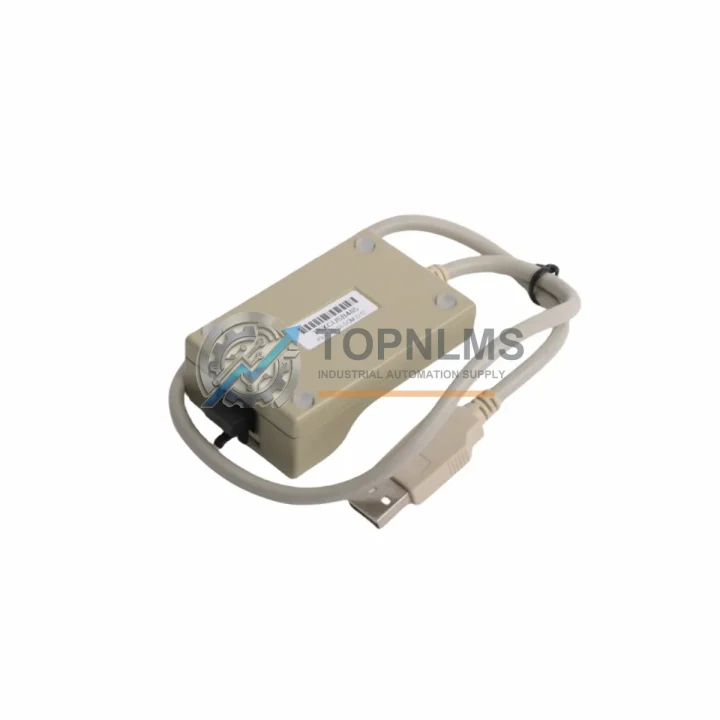
The Schneider Electric TSXCUSB485 is an original USB-to-RS485 programming cable engineered specifically for the TSX Premium PLC series. In industrial environments where control system uptime is non-negotiable, this cable serves as the critical communication link between a maintenance engineer’s laptop and the PLC CPU — enabling program uploads, downloads, online diagnostics, and parameter adjustments without interrupting production. Keeping a verified original spare on the shelf is not optional; it is a fundamental element of any responsible preventive maintenance strategy.
Across manufacturing plants, water treatment facilities, energy substations, and process automation lines, the TSXCUSB485 is the standard interface for TSX Premium controllers including the TSXP571634M, TSXP572634M, and TSXP573634M CPU modules. When a cable fails — whether from connector wear, shielding degradation, or driver incompatibility after a Windows update — the inability to access the PLC can extend an unplanned shutdown from minutes to hours. A pre-stocked original replacement eliminates that risk entirely.
Critical Technical Specs
| Part Number / SKU |
TSXCUSB485 |
| Brand |
Schneider Electric |
| Series |
TSX Premium PLC |
| Interface (PC Side) |
USB Type-A (USB 2.0 compatible) |
| Interface (PLC Side) |
RS-485 / SUB-D 9-pin |
| Communication Protocol |
Uni-Telway / Modbus RTU |
| Compatible PLC Families |
TSX Premium, TSX Micro (via RS-485 port) |
| Compatible Software |
Unity Pro, PL7 Pro |
| Cable Length |
Approx. 3 m |
| Weight |
160 g |
| Origin |
France |
| Operating Temperature |
0°C to +60°C |
| Installation |
Plug-and-play; driver installation via Unity Pro or standalone installer |
| Maintenance Recommendation |
Inspect connector pins and shielding every 12 months; replace if continuity test fails |
| Warranty |
12 Months |
Preventive Maintenance Strategy
A programming cable failure is rarely an isolated event — it is a signal that the broader maintenance toolkit and control cabinet components deserve a systematic review. When scheduling a TSXCUSB485 replacement or inspection, experienced maintenance engineers use the opportunity to audit the entire TSX Premium control system for latent wear.
Begin with the TSX Premium CPU module itself. Verify firmware version compatibility with your current Unity Pro or PL7 Pro installation, and confirm that the RS-485 terminal port shows no physical damage or oxidation. Alongside the CPU, inspect the TSXRKY8 or TSXRKY12 rack backplane — loose rack connections are a common source of intermittent communication errors that are often misdiagnosed as cable faults.
Next, audit the power supply module (such as the TSXPSY2600M or TSXPSY5500M) for output voltage stability. An under-voltage condition on the 24 VDC bus can corrupt active program transfers mid-session, leading to CPU faults that appear to originate from the programming interface. Simultaneously, check the digital I/O modules — TSXDEY16D2 input modules and TSXDSY16T2 output modules — for blown fuses, stuck channels, or degraded terminal block connections that may be masking process alarms.
For systems using fieldbus communication, this is also the right moment to verify the TSXSCP114 or TSXSCP111 Uni-Telway/RS-485 communication module termination resistors and cable shielding continuity. A degraded RS-485 bus will cause erratic behavior that is indistinguishable from a faulty programming cable until proper diagnostics are performed. If your plant uses Modbus TCP/IP for SCADA integration, inspect the TSXETY110 or TSXETY410 Ethernet module for firmware currency and port integrity.
Do not overlook the analog I/O modules such as the TSXAEY414 or TSXASY410. Drift in analog signal conditioning is a slow-developing fault that preventive maintenance cycles frequently catch before it causes a process deviation. Finally, review the terminal blocks and wiring harnesses within the control cabinet — particularly any Schneider Linergy or Preventa safety relay modules in the same enclosure — for insulation degradation, loose ferrules, or corrosion at the DIN rail mounting points.
Stocking the TSXCUSB485 alongside these complementary components ensures that your maintenance team can respond to any TSX Premium system fault within a single shift, without waiting for international freight.
Strategic Replacement Solutions
The TSXCUSB485 is the direct factory replacement for older Schneider programming interfaces including the legacy TSXPCX1031 serial cable, which required a physical COM port — a connector type no longer present on modern laptops and industrial PCs. The USB-to-RS485 architecture of the TSXCUSB485 eliminates the need for USB-to-serial adapters, which introduce driver instability and are a frequent source of communication timeouts during critical programming sessions.
For plants operating aging TSX Premium systems — some of which have been in continuous service for 15 to 20 years — maintaining original Schneider Electric spare parts is the most reliable strategy for system longevity. Third-party cable alternatives frequently lack proper Uni-Telway protocol handshaking, resulting in connection failures with PL7 Pro or Unity Pro that consume valuable maintenance time. The original TSXCUSB485 is tested and validated against the full TSX Premium CPU range, ensuring zero-compromise compatibility.
From a procurement standpoint, sourcing the TSXCUSB485 through a verified industrial spare parts supplier — rather than waiting for OEM lead times that can extend to 8–16 weeks — allows maintenance managers to maintain a lean but resilient spare parts inventory. A single unit on the shelf, tested and sealed, is sufficient for most facilities; high-criticality sites with multiple TSX Premium racks should consider holding two units to cover simultaneous multi-line maintenance windows.
Support FAQ
Q1: Is the TSXCUSB485 compatible with both Unity Pro and PL7 Pro software?
Yes. The TSXCUSB485 supports both Unity Pro (all versions) and PL7 Pro (v4.5 and above) on Windows 7, Windows 10, and Windows 11. Driver installation is handled automatically by Unity Pro or via the standalone Schneider USB driver package. Ensure the correct COM port is assigned in Device Manager before initiating a connection.
Q2: How do I verify the cable is functioning before deploying it in the field?
Each unit shipped from TOPNLMS is pre-tested for USB enumeration, RS-485 signal continuity, and connector integrity. Upon receipt, connect the cable to a PC and confirm the USB device appears in Device Manager without error codes. A loopback test on the RS-485 terminals using a serial terminal application provides additional confidence before field deployment.
Q3: What does the 12-month warranty cover?
The 12-month warranty covers manufacturing defects, connector failure, and cable shielding integrity under normal industrial use conditions. It does not cover physical damage from improper handling, liquid ingress, or use outside the specified operating temperature range. Warranty claims are processed via [email protected] with proof of purchase and a fault description.
Q4: Can I use this cable for TSX Micro PLCs as well?
Yes, the TSXCUSB485 is compatible with TSX Micro series PLCs (TSX3721, TSX3722, TSX3741, etc.) that are equipped with an RS-485 terminal port. Verify the port type on your specific TSX Micro model before ordering, as some early TSX Micro variants use a proprietary mini-DIN connector that requires a different adapter.