

ProSoft Technology
ProSoft MVI56-DFCM Replacement/Upgrade for ControlLogix
MVI56-DFCMMVI56-DFCM drop-in replacement for ControlLogix. DF1 full-duplex compatibility, 12-month warranty, fast global shipping from TOPNLMS.
Request availability, condition, lead time and export shipping details for MVI56E-MNET.
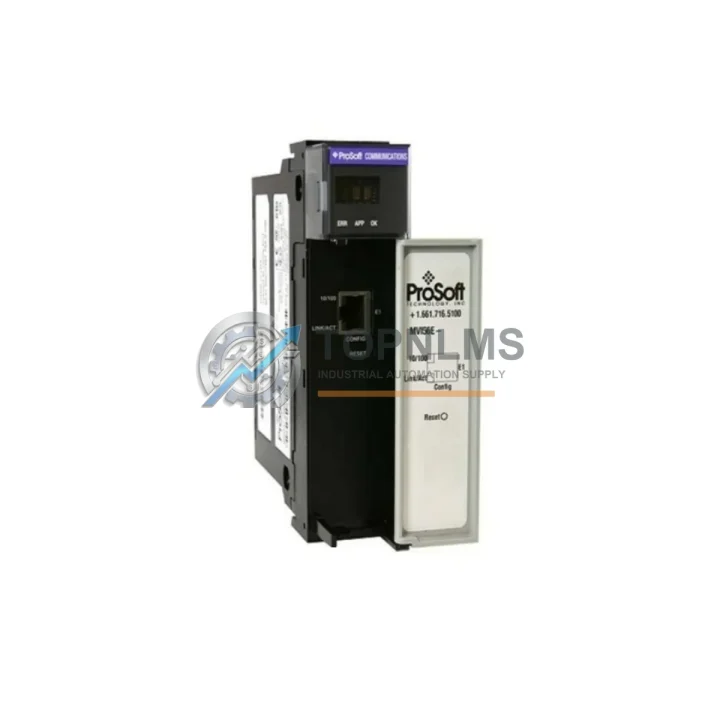
Send this exact part number, quantity and destination country. TOPNLMS will confirm availability, condition and export lead time before quotation.
The ProSoft MVI56E-MNET is a Modbus TCP/IP communication module designed for the Allen-Bradley ControlLogix 1756 rack platform. As a genuine MVI56E series spare part, it delivers reliable protocol bridging between Modbus TCP/IP networks and the ControlLogix backplane — a critical function in process plants, utilities, water treatment facilities, and manufacturing lines where legacy Modbus field devices must communicate with modern Logix-based control systems.
Maintaining an operational stock of the MVI56E-MNET is a cornerstone of any serious industrial spare parts strategy. Unplanned communication failures between a ControlLogix controller and downstream Modbus TCP/IP devices — such as variable frequency drives, flow meters, remote I/O panels, or SCADA gateways — can halt production within minutes. Having a verified, tested replacement unit on the shelf eliminates the lead-time risk associated with sourcing from the open market during an emergency shutdown.
The MVI56E-MNET occupies a single slot in the 1756 chassis and is compatible with all standard ControlLogix rack sizes, including the 1756-A4, 1756-A7, 1756-A10, and 1756-A13. Its configuration is managed through RSLogix 5000 or Studio 5000 Logix Designer using ProSoft’s PCB (ProSoft Configuration Builder) utility, which stores all port settings, polling tables, and data mapping parameters. When replacing a failed unit, the configuration file can be reloaded directly from the engineering workstation, dramatically reducing commissioning time and minimizing downtime to the duration of the physical swap.
| Parameter | Specification |
|---|---|
| Part Number | MVI56E-MNET |
| Brand / Manufacturer | ProSoft Technology |
| Series | MVI56E |
| Host Platform | Allen-Bradley ControlLogix (1756 Series) |
| Protocol | Modbus TCP/IP (Client & Server) |
| Network Interface | Dual RJ-45 Ethernet ports (10/100 Mbps) |
| Rack Slot Requirement | Single slot, 1756 chassis |
| Compatible Chassis | 1756-A4, 1756-A7, 1756-A10, 1756-A13, 1756-A17 |
| Power Consumption | 800 mA @ 5 VDC (from backplane) |
| Operating Temperature | 0°C to 60°C (32°F to 140°F) |
| Configuration Tool | ProSoft Configuration Builder (PCB) |
| Max Modbus Nodes | Up to 100 client/server connections |
| Country of Origin | United States |
| Weight | 360 g |
| Warranty | 12 Months — tested before shipment |
A disciplined preventive maintenance program for a ControlLogix-based control system extends well beyond the MVI56E-MNET itself. During scheduled shutdowns or annual inspections, maintenance engineers should treat the communication module replacement as part of a broader cabinet audit. The 1756-L73 ControlLogix controller and its associated 1756-EN2T EtherNet/IP communication module should be inspected for firmware currency and connector integrity at the same time — these three modules share the same backplane and any one of them can disrupt the entire control loop if degraded.
Power integrity is equally critical. The 1756-PA75 power supply feeding the ControlLogix chassis should be checked for output voltage stability and capacitor aging, particularly in high-ambient-temperature environments. A failing power supply is a common root cause of intermittent communication faults that are often misdiagnosed as module failures. Keeping a spare 1756-PA75 or 1756-PB75 alongside the MVI56E-MNET in your maintenance inventory is strongly recommended.
On the field device side, the Modbus TCP/IP network connected to the MVI56E-MNET typically includes devices such as Schneider Electric ATV320 variable frequency drives, Yokogawa EJA series pressure transmitters, or third-party remote I/O panels. Verifying the IP address table and polling configuration in ProSoft Configuration Builder during each maintenance cycle ensures that any field device additions or replacements are reflected in the module’s data map before the next production run.
For installations where the MVI56E-MNET bridges to serial Modbus RTU devices through an Ethernet-to-serial converter, the converter itself — often a Moxa NPort 5150 or equivalent — should be included in the spare parts list. Signal isolation between the Ethernet segment and the serial loop is also worth reviewing; a Phoenix Contact FL ISOLATOR or similar DIN-rail signal isolator can prevent ground loop interference from corrupting Modbus frames.
Finally, the 1756-TBCH or 1756-TBS6H terminal base wiring connectors on adjacent I/O modules in the same cabinet should be inspected for corrosion and torque compliance. Loose field wiring on a 1756-IB16 digital input module or 1756-OB16E digital output module can generate spurious status changes that are logged as communication anomalies, complicating fault diagnosis during a shutdown investigation.
The MVI56E-MNET is a direct replacement for the earlier MVI56-MNET module, which has reached end-of-life status. The MVI56E series introduced enhanced Ethernet performance, improved diagnostic LEDs, and a more robust configuration interface compared to the original MVI56 generation. For sites still running MVI56-MNET units, migrating to the MVI56E-MNET requires no hardware changes to the 1756 chassis or backplane — the module occupies the same single slot and draws power from the same backplane connector.
The configuration migration from MVI56-MNET to MVI56E-MNET is straightforward: the existing PCB project file can be imported into the updated ProSoft Configuration Builder version, reviewed for compatibility, and downloaded to the new module. In most cases, the RSLogix 5000 or Studio 5000 program requires only a minor update to the module definition in the I/O tree — the data structure and tag mapping remain functionally identical, preserving the existing ladder logic and HMI tag references without modification.
For plants operating mixed-generation ControlLogix systems — where some racks contain 1756-L6x controllers and others have been upgraded to 1756-L7x or 1756-L8x — the MVI56E-MNET is compatible across all generations, providing a single spare part number that covers the entire installed base. This simplifies procurement, reduces the number of unique spare part SKUs in the storeroom, and lowers the total cost of inventory management.
Q1: Is the MVI56E-MNET a drop-in replacement for the MVI56-MNET?
Yes. The MVI56E-MNET is the direct successor to the MVI56-MNET and occupies the same single slot in any 1756 chassis. The backplane connector, power draw, and data structure are compatible. A configuration file update using ProSoft Configuration Builder is required, but no hardware or wiring changes are needed.
Q2: How is the module tested before shipment?
Each MVI56E-MNET unit is powered on and subjected to functional verification prior to packaging. Diagnostic LED status, firmware version, and Ethernet port integrity are confirmed. A 12-month warranty is provided from the date of shipment, covering manufacturing defects and functional failures under normal operating conditions.
Q3: What is the recommended inventory strategy for this module?
For facilities with two or more ControlLogix racks using Modbus TCP/IP communication, maintaining at least one MVI56E-MNET spare on-site is recommended. Given the module’s role as a protocol gateway, its failure directly impacts all Modbus field devices on the network. A single spare unit eliminates emergency procurement lead times, which can range from days to weeks depending on regional availability.
Q4: Can the module be configured without a ProSoft license?
ProSoft Configuration Builder (PCB) is a free utility available from ProSoft Technology’s website. No license or subscription is required to configure, download, or monitor the MVI56E-MNET. The RSLogix 5000 or Studio 5000 project file for the module’s Add-On Instruction (AOI) is also freely available from ProSoft’s product page.
MVI56-DFCM drop-in replacement for ControlLogix. DF1 full-duplex compatibility, 12-month warranty, fast global shipping from TOPNLMS.
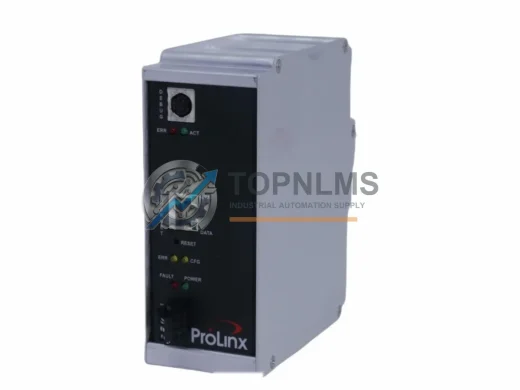
ProSoft 5201-DFNT-EGD EtherNet/IP to GE EGD in-chassis gateway. Rugged, reliable, 12-month warranty. In stock at TOPNLMS — fast global shipping.

ProSoft MVI56-101M Modbus RTU/ASCII module for ControlLogix. Ruggedized, in stock, tested, 12-month warranty. Fast shipping — TOPNLMS.

ProSoft PLX31-MBTCP-MBS Modbus TCP/IP to Serial gateway. Rugged, EMI-resistant, 12-month warranty. In stock — fast shipping from TOPNLMS.
Click Quote This Model and the Part Number field will auto-fill with MVI56E-MNET.