

ProSoft Technology
ProSoft MVI56-DFCM Replacement/Upgrade for ControlLogix
MVI56-DFCMMVI56-DFCM drop-in replacement for ControlLogix. DF1 full-duplex compatibility, 12-month warranty, fast global shipping from TOPNLMS.
Request availability, condition, lead time and export shipping details for ILX69-PBM.
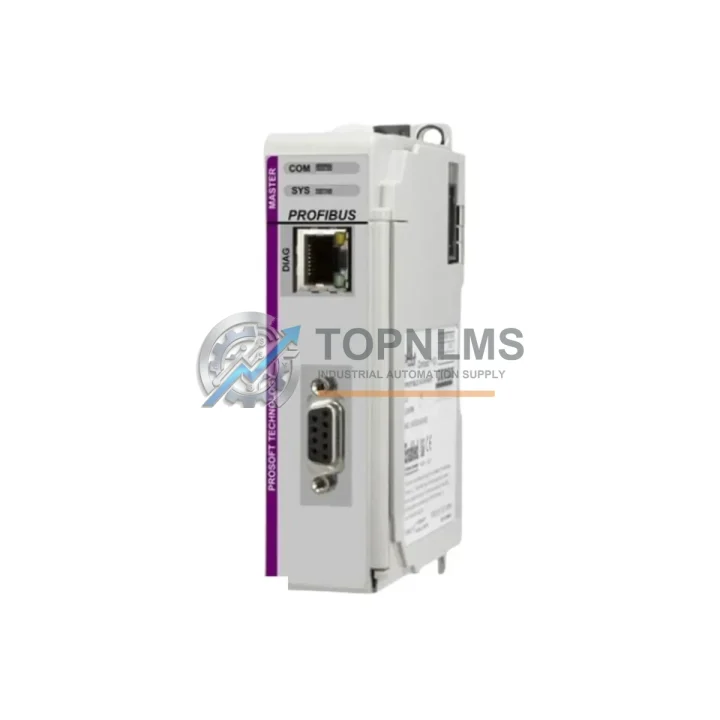
Send this exact part number, quantity and destination country. TOPNLMS will confirm availability, condition and export lead time before quotation.
The PROSOFT ILX69-PBM is an original PROFIBUS DP Master communication module engineered for seamless integration into Allen-Bradley ControlLogix and CompactLogix backplane environments. As a critical network gateway between the PLC controller and field-level PROFIBUS DP slave devices — including variable frequency drives, remote I/O stations, intelligent sensors, and distributed control nodes — the ILX69-PBM is a foundational component in maintaining uninterrupted industrial process control. Sourced directly from authorized supply channels, every unit available through TOPNLMS is tested, verified, and backed by a 12-month quality warranty.
In modern manufacturing facilities, process plants, and utility infrastructure, PROFIBUS DP networks carry real-time cyclic data between the master controller and dozens of slave devices. A failed or degraded ILX69-PBM can cascade into full production line shutdowns, loss of drive control, or unresponsive remote I/O — scenarios that cost thousands per hour in downtime. Maintaining a certified spare on the shelf is not optional; it is a fundamental pillar of any serious preventive maintenance program.
| Parameter | Specification |
|---|---|
| Part Number | ILX69-PBM |
| Manufacturer | PROSOFT Technology |
| Series | ILX69 |
| Protocol | PROFIBUS DP Master (EN 50170 / IEC 61158) |
| Backplane Compatibility | Allen-Bradley ControlLogix / CompactLogix (1756 / 1769 series) |
| PROFIBUS DP Slaves Supported | Up to 125 slave devices per master |
| Baud Rate | 9.6 kbps – 12 Mbps (auto-detect) |
| Data Exchange | Cyclic (DPV0) and Acyclic (DPV1) services |
| Configuration Interface | ProSoft Configuration Builder (PCB) software |
| Backplane Current Draw | 800 mA @ 5 VDC (typical) |
| Operating Temperature | 0°C to +60°C (32°F to 140°F) |
| Storage Temperature | -40°C to +85°C |
| Relative Humidity | 5% to 95% non-condensing |
| Certifications | CE, UL, cUL |
| Form Factor | Single-slot ControlLogix / CompactLogix module |
| Origin | USA |
| Warranty | 12 Months (TOPNLMS) |
| Pre-shipment Testing | Full functional verification performed |
| Condition | Original / Genuine |
When scheduling a planned maintenance window around the ILX69-PBM, experienced maintenance engineers know that the communication module rarely fails in isolation. The PROFIBUS DP network is an ecosystem — and a thorough inspection of the control cabinet should extend to every component that shares the same electrical environment and data pathway.
Begin with the ControlLogix chassis and backplane. The ILX69-PBM occupies a single slot in the 1756 or 1769 rack, and the backplane connector pins should be inspected for oxidation or mechanical wear. While the module is removed, it is prudent to verify the condition of the 1756-PA75 or 1756-PB75 power supply module — a degraded power supply delivering marginal 5 VDC or 24 VDC rails is a common root cause of intermittent communication faults that are often misdiagnosed as module failures.
Next, trace the PROFIBUS DP cable from the ILX69-PBM’s DB9 port to the first slave device. Inspect the PROFIBUS DP bus termination resistors at both cable ends — improper termination is the leading cause of network instability at baud rates above 1.5 Mbps. If the facility uses PROFIBUS repeaters to extend the network beyond segment length limits, those repeater units should be included in the inspection checklist, as they are often overlooked during routine maintenance cycles.
At the slave device level, review the status of remote I/O modules (such as Siemens ET 200S or ET 200M distributed I/O stations) connected to the PROFIBUS DP network. A single slave with a corrupted GSD configuration or a failed ASIC can force the master into error state and trigger a full network halt. Simultaneously, check the digital and analog I/O modules within those remote stations — modules such as 6ES7 131-series digital input modules or 6ES7 134-series analog input modules are high-wear items in environments with frequent signal cycling.
For facilities running variable frequency drives on PROFIBUS DP — such as Siemens SINAMICS G120 or S120 drives with CBE20 communication boards, or ABB ACS880 drives with FPBA-01 PROFIBUS adapters — the drive communication board firmware version should be verified against the master’s GSD file revision. Firmware mismatches are a silent source of cyclic data errors that only manifest under full production load.
Inside the control cabinet, inspect the 24 VDC power distribution terminals and fuse modules. Phoenix Contact or Weidmüller terminal blocks with integrated fuse holders are common in PROFIBUS-equipped panels, and blown fuses on field device supply circuits can cause slave dropouts that appear as master communication errors. A signal isolator or surge protection module on the PROFIBUS line — particularly in environments with heavy motor loads or frequent lightning exposure — is a worthwhile addition if not already present.
Finally, if the control system includes an HMI panel (such as a Siemens TP700 Comfort or Allen-Bradley PanelView Plus 7) communicating with the ControlLogix controller over Ethernet/IP, verify that the HMI’s tag database reflects the correct PROFIBUS slave addresses and data offsets. After replacing the ILX69-PBM and re-downloading the ProSoft Configuration Builder project, the HMI may require a tag refresh to re-establish correct data mapping.
The ILX69-PBM is a direct replacement for aging PROFIBUS DP master solutions in ControlLogix systems, including earlier-generation ProSoft modules such as the MVI56-PDPMV1 and MVI56E-PDPMV1 — though those modules occupy the 1756 rack rather than the 1769 CompactLogix form factor. For facilities still operating legacy MVI56-series communication modules, the ILX69-PBM represents a migration path that preserves the existing PROFIBUS DP slave network topology while modernizing the master interface to the current ILX69 platform architecture.
Replacement is straightforward: remove the failed module from the backplane, insert the ILX69-PBM into the same slot, download the saved ProSoft Configuration Builder project file, and cycle power. In most installations, the PROFIBUS DP network will resume cyclic data exchange within 30 seconds of power-up — a critical advantage in time-sensitive production environments where every minute of downtime carries measurable cost.
For maintenance teams managing multi-site operations or large spare parts inventories, stocking the ILX69-PBM alongside its companion components — including a spare ControlLogix processor module, a backup 1756-EN2T Ethernet/IP communication module, and a set of pre-terminated PROFIBUS DP cables with DB9 connectors — creates a complete rapid-response kit capable of restoring full system functionality without waiting for emergency procurement. TOPNLMS maintains ready stock of the ILX69-PBM with same-day dispatch capability for urgent orders.
Q1: Is the ILX69-PBM compatible with both ControlLogix and CompactLogix platforms?
The ILX69-PBM is designed for the ILX69 platform, which is compatible with Allen-Bradley CompactLogix (1769 series) backplanes. For ControlLogix (1756 series) applications, the equivalent module is the MVI56E-PDPMV1. Please verify your rack type before ordering. Our technical team can assist with compatibility confirmation prior to shipment.
Q2: What pre-shipment testing is performed on the ILX69-PBM?
Every ILX69-PBM unit shipped by TOPNLMS undergoes full functional verification, including backplane communication checks, PROFIBUS DP port integrity testing, and firmware version confirmation. A test report is available upon request. All units are shipped in anti-static packaging with physical protection to prevent transit damage.
Q3: How long does the 12-month warranty cover, and what does it include?
The 12-month warranty covers manufacturing defects and functional failures under normal operating conditions from the date of shipment. It does not cover damage resulting from incorrect installation, overvoltage events, or physical mishandling. In the event of a warranty claim, TOPNLMS will arrange replacement or repair at no additional cost to the buyer.
Q4: Can I use the same ProSoft Configuration Builder project file from my old module on the replacement ILX69-PBM?
Yes. The ILX69-PBM uses the same ProSoft Configuration Builder (PCB) software platform. Provided your existing project file was saved prior to the module failure, it can be downloaded directly to the replacement unit without modification. We recommend maintaining a backup copy of all PCB project files in a secure, off-machine location as part of your standard documentation and disaster recovery protocol.
MVI56-DFCM drop-in replacement for ControlLogix. DF1 full-duplex compatibility, 12-month warranty, fast global shipping from TOPNLMS.
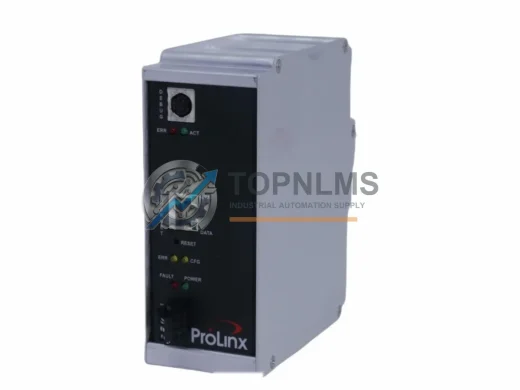
ProSoft 5201-DFNT-EGD EtherNet/IP to GE EGD in-chassis gateway. Rugged, reliable, 12-month warranty. In stock at TOPNLMS — fast global shipping.

ProSoft MVI56-101M Modbus RTU/ASCII module for ControlLogix. Ruggedized, in stock, tested, 12-month warranty. Fast shipping — TOPNLMS.

ProSoft PLX31-MBTCP-MBS Modbus TCP/IP to Serial gateway. Rugged, EMI-resistant, 12-month warranty. In stock — fast shipping from TOPNLMS.
Click Quote This Model and the Part Number field will auto-fill with ILX69-PBM.