Product Overview
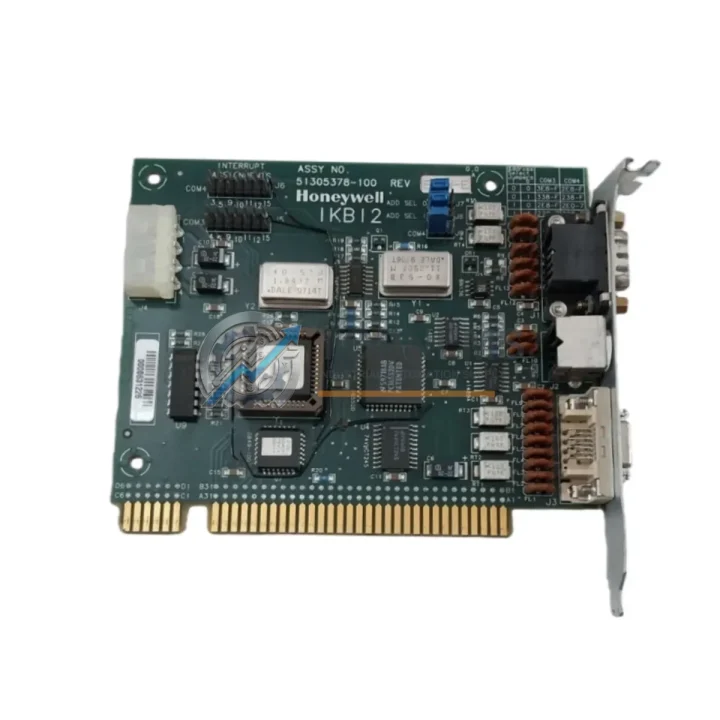
Honeywell 51305378-100 IKBI2 Replacement for TDC 3000: Seamless Legacy DCS Transition
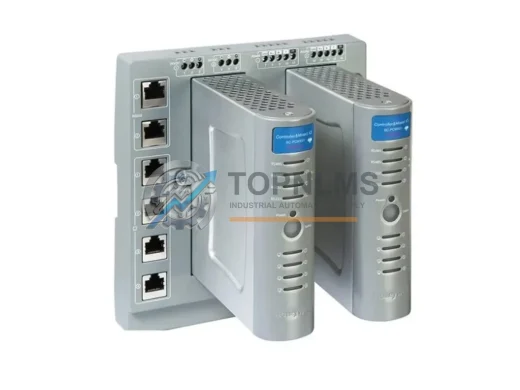
The Honeywell 51305378-100 (IKBI2) Printer Interface Board is a critical legacy component within the TDC 3000 Distributed Control System — one of the most widely deployed process automation platforms in refining, petrochemical, and power generation industries. As TDC 3000 systems age and OEM support windows close, facilities face mounting pressure to source reliable replacement boards that maintain full backward compatibility with existing wiring, backplane connectors, and system software. The 51305378-100 IKBI2 addresses this need directly: it slots into the original card cage without mechanical modification, preserves existing I/O wiring terminations, and communicates natively with the TDC 3000 Local Control Network (LCN) and Universal Control Network (UCN) architecture.
For maintenance engineers managing aging DCS infrastructure, the challenge is not simply finding a part — it is finding a part that eliminates re-engineering risk. A mismatched interface board can trigger firmware incompatibilities, force costly reprogramming of associated 51304485-100 History Module configurations, or disrupt communication with upstream 51401288-100 Application Module assemblies. The IKBI2 is engineered to avoid all of these failure modes, making it the preferred drop-in solution for facilities that cannot afford extended downtime during a printer subsystem failure.
Compatibility Comparison Table
| Parameter |
Legacy / Replaced Model |
Honeywell 51305378-100 (IKBI2) |
| Part Number |
51305378-050 / Earlier IKBI Revisions |
51305378-100 (IKBI2) |
| Platform |
TDC 3000 / TDC 2000 (limited) |
TDC 3000 LCN / UCN |
| Interface Type |
Parallel Printer Interface |
Parallel Printer Interface (Centronics-compatible) |
| Backplane Connector |
Standard TDC 3000 card cage slot |
Direct drop-in, no mechanical modification |
| Wiring Compatibility |
Existing field wiring retained |
Full wiring compatibility — no re-termination required |
| Communication Protocol |
LCN proprietary |
LCN proprietary — native compatibility |
| Power Supply |
TDC 3000 card cage bus power |
Card cage bus powered — no external PSU required |
| Firmware |
Revision-dependent |
Compatible with standard TDC 3000 firmware revisions |
| Physical Dimensions |
Standard TDC 3000 card form factor |
Identical form factor — direct slot replacement |
| Operating Temperature |
0–60°C |
0–60°C |
| Warranty |
OEM support discontinued |
12-Month Warranty from TOPNLMS |
Seamless Upgrade Solutions: Migration Planning for TDC 3000 Printer Subsystems
Replacing the 51305378-100 IKBI2 in a live TDC 3000 environment requires a structured approach that accounts for the interdependencies within the LCN card cage and the broader control room architecture. A printer interface failure rarely occurs in isolation — it is often a signal that adjacent boards are approaching end-of-life as well. A proactive migration plan should address the full scope of the printer subsystem and its upstream dependencies.
Begin by auditing the 51304485-100 History Module, which manages data logging and report generation tasks that feed directly into the printer interface. If the History Module firmware is running an older revision, a simultaneous upgrade of both boards eliminates the risk of a second unplanned outage within weeks of the initial repair. Similarly, inspect the 51401288-100 Application Module for any configuration parameters that reference the printer interface node address — these may need to be verified or updated in the system database after the IKBI2 replacement is installed.
Within the card cage itself, check the condition of the 51109684-100 Power Supply Module. Aging power supplies are a leading cause of intermittent board failures in TDC 3000 systems, and a degraded PSU can cause the replacement IKBI2 to exhibit the same symptoms as the failed original. Replacing the power supply module concurrently with the printer interface board is a best practice that significantly reduces callback risk.
For facilities that use the TDC 3000 printer subsystem to generate shift reports, alarm summaries, or batch records, the 51304516-100 Universal Station (US) operator interface is the upstream source of print commands. Verify that the Universal Station software configuration correctly maps to the new IKBI2 node after installation. In multi-node LCN environments, also confirm that the 51401195-100 Network Interface Module (NIM) routing tables are intact, as LCN node address conflicts can prevent the replacement board from being recognized by the system.
If the migration scope extends beyond the printer subsystem to a broader TDC 3000 modernization effort, consider the role of the 51304754-100 Hiway Gateway in bridging legacy UCN field devices to the LCN backbone. Facilities that are phasing out TDC 3000 hardware in favor of Experion PKS C300 or Experion PKS C200 controllers should plan the IKBI2 replacement as a short-term stabilization measure while the longer-term migration architecture is finalized. In this context, sourcing a tested and warranted 51305378-100 from TOPNLMS provides a cost-effective bridge that keeps the existing system operational without committing to a full platform migration before the engineering team is ready.
Additional components commonly addressed during TDC 3000 printer subsystem maintenance include the 51309276-100 Printer Cable Assembly for Centronics interface connections, 51198685-100 termination panels for field wiring consolidation, and 51304443-100 I/O Link Interface Modules that manage data flow between the process I/O subsystem and the LCN. Addressing these components as part of a coordinated maintenance window — rather than reactively after individual failures — is the most effective strategy for extending TDC 3000 system life while minimizing total cost of ownership.
Retrofit Guidance FAQ
Q1: Can the 51305378-100 IKBI2 be installed without modifying existing field wiring or backplane connections?
Yes. The IKBI2 is a direct slot-for-slot replacement for earlier IKBI revisions within the TDC 3000 card cage. No re-termination of field wiring is required, and the board uses the standard TDC 3000 backplane connector. After physical installation, the system should automatically recognize the new board during the next LCN initialization cycle. Verify the node address assignment in the system database matches the original configuration before bringing the board online.
Q2: Is the 51305378-100 compatible with both the LCN and UCN communication architectures in TDC 3000?
The IKBI2 communicates natively over the LCN (Local Control Network). It does not interface directly with the UCN (Universal Control Network), which is the field device network. However, print commands originating from UCN-connected controllers are routed through the LCN via the Application Module and Universal Station before reaching the printer interface. No protocol conversion or additional hardware is required for standard TDC 3000 configurations.
Q3: What pre-installation checks should be performed before replacing the IKBI2 in a live TDC 3000 system?
Before installation, verify the following: (1) confirm the card cage power supply voltage is within specification using a calibrated meter; (2) back up the current system database, including printer node address assignments and report configurations; (3) check the LCN node address of the failed board and ensure the replacement will be assigned the same address; (4) inspect the Centronics printer cable for continuity and connector integrity; (5) confirm the replacement board has been tested and powered on at the supplier level prior to shipment. All TOPNLMS units are powered-on tested before dispatch.
Q4: What does the 12-month warranty from TOPNLMS cover, and what is the replacement process if a fault is identified after installation?
The 12-month warranty covers manufacturing defects and functional failures under normal operating conditions. If a fault is identified after installation, contact TOPNLMS at [email protected] with the order reference, fault description, and installation date. TOPNLMS will assess the return request and, where the fault is confirmed as a product defect, will dispatch a replacement unit. Return shipping logistics and timelines are confirmed at the time of the warranty claim. Warranty does not cover damage resulting from incorrect installation, overvoltage, or physical mishandling.
Warranty Assurance
Every Honeywell 51305378-100 IKBI2 unit supplied by TOPNLMS is covered by a 12-month warranty from the date of shipment. Prior to dispatch, each unit undergoes a powered-on functional test to verify board initialization, LCN communication readiness, and printer interface signal integrity. Units that do not pass the pre-shipment test are not dispatched.
TOPNLMS sources inventory through established industrial surplus and authorized distribution channels. All units are inspected for physical condition, connector integrity, and component-level anomalies before being listed as available stock. Boards showing signs of prior repair, component substitution, or physical damage are excluded from the available inventory pool.
For procurement teams managing spare parts budgets, TOPNLMS offers flexible order quantities — from single-unit emergency replacements to multi-unit strategic stock purchases. Lead times for in-stock units are typically 3–5 business days for international shipments from Xiamen, China, with express options available for critical downtime situations. All shipments include a packing list, test report, and warranty certificate.
For technical pre-sales questions, compatibility verification, or post-sale warranty support, contact the TOPNLMS technical team directly. Response times for warranty and technical inquiries are within one business day.