Product Overview
Bosch Rexroth HDD02.2-W040N-HS12-01-FW DIAX04 ELS Replacement: Seamless Transition & Legacy System Compatibility
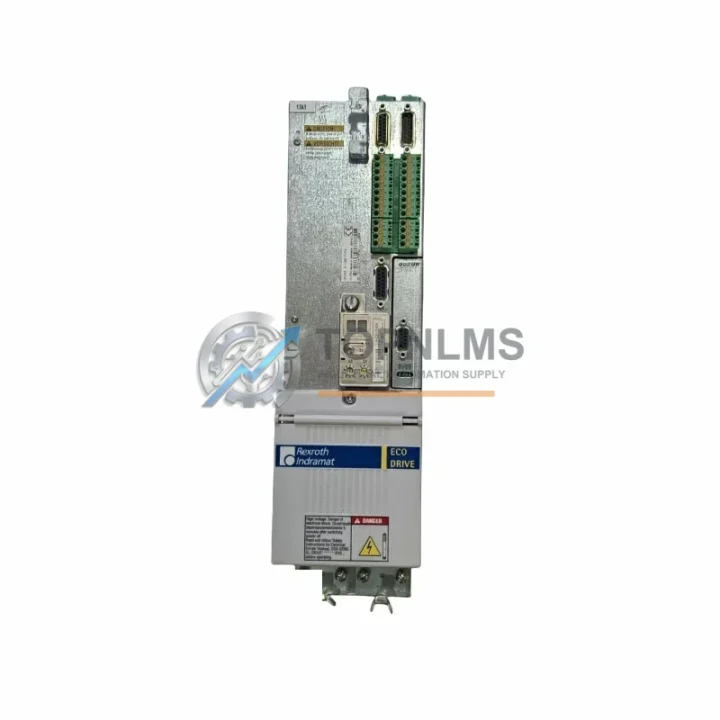
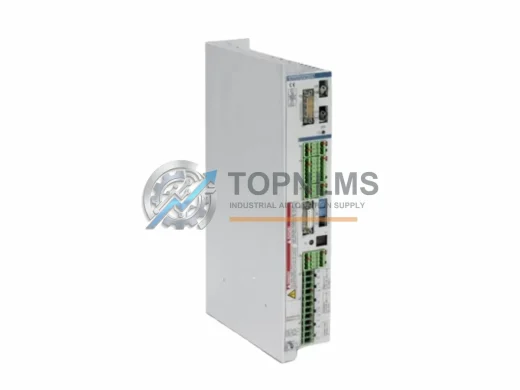
The Bosch Rexroth HDD02.2-W040N-HS12-01-FW paired with firmware FWA-DIAX04-ELS-05VRS-MS is a high-performance AC servo drive from the DIAX04 ELS (Electronic Line Shaft) series, engineered for precision motion control in demanding industrial automation environments. Whether you are replacing a failed unit, upgrading an aging DIAX04 platform, or migrating from an earlier HDD01 or HDS series drive, this module delivers a validated, drop-in compatible solution that minimizes engineering rework and production downtime.
The DIAX04 ELS firmware variant is specifically designed for electronic gearing and synchronization applications — common in printing, packaging, converting, and textile machinery. The HDD02.2-W040N-HS12-01-FW model provides 40 A continuous output current with SERCOS interface communication, making it fully compatible with existing SERCOS ring topologies and Rexroth IndraControl or IndraMotion controller platforms without requiring protocol conversion or gateway hardware.
Compatibility Comparison Table
| Parameter |
Legacy / Replaced Model |
HDD02.2-W040N-HS12-01-FW (This Unit) |
| Series |
DIAX04 HDD01 / HDS02 / HDS03 |
DIAX04 HDD02.2 ELS |
| Firmware |
FWA-DIAX04-ELS-04VRS-MS or earlier |
FWA-DIAX04-ELS-05VRS-MS |
| Continuous Output Current |
Varies (typically 28–40 A) |
40 A |
| Communication Interface |
SERCOS I / Analog ±10 V |
SERCOS II (HS12 = SERCOS fiber optic) |
| Power Supply Compatibility |
HVR / HVE / KVR supply modules |
Compatible with HVR02.2, HVE02.2, KVR supply modules |
| Mounting / Form Factor |
Standard DIAX04 drive rail |
Identical DIAX04 rail mount — no cabinet modification required |
| Encoder Interface |
Resolver / EnDat / SSI |
Resolver / EnDat / SSI (backward compatible) |
| Wiring Compatibility |
X1, X2, X3, X8 connector pinout |
Identical connector pinout — existing cables reusable |
| Installation Space |
Standard DIAX04 width slot |
Same physical dimensions — no panel redesign needed |
| Replacement Recommendation |
Direct swap for HDD01.1-W040N, HDS02.2-W040N |
Verify firmware version and SERCOS baud rate before commissioning |
| Warranty |
— |
12-Month Warranty included |
Seamless Upgrade Solutions
A successful migration from a legacy DIAX04 or HDS-series servo system to the HDD02.2-W040N-HS12-01-FW involves more than a single drive swap. In most retrofit projects, engineers also address the surrounding system architecture to ensure full compatibility and long-term reliability.
On the power supply side, the HVR02.2-W018N or HVE02.2-W018N regenerative power supply modules are the standard companions in DIAX04 drive cabinets. These units share the same DC bus architecture and require no modification when the HDD02.2 drive is replaced. If the existing supply module is also approaching end-of-life, sourcing a matched HVR or HVE unit alongside the drive is strongly recommended to avoid a secondary failure during commissioning.
The SERCOS fiber optic ring connecting the drive to the controller relies on SERCOS interface cards installed in the IndraControl or IndraMotion controller — typically the CSB01.1N or CDB01.1C communication boards. These cards manage the SERCOS cycle time and node addressing. When replacing the HDD02.2 drive, the SERCOS node address (set via the S1 rotary switch on the drive front panel) must match the address previously assigned to the failed unit in the controller project.
Motor feedback is handled through the encoder cable connecting the drive’s X8 feedback port to the servo motor — commonly a Bosch Rexroth MKD or MKE series servo motor. The HDD02.2-W040N-HS12-01-FW supports resolver, EnDat 2.1, and SSI encoder protocols, meaning existing motor and cable assemblies can be reused without modification in the vast majority of DIAX04 retrofit scenarios.
For sites where the original programming environment is no longer available, the IndraWorks DS or legacy DriveTop software (connected via the X2 RS232 service port or a USB-to-RS232 adapter cable) is used to load the FWA-DIAX04-ELS-05VRS-MS firmware, configure drive parameters, and perform the initial motor identification run. Having the correct programming cable and software version on hand before the scheduled maintenance window is critical to minimizing downtime.
In multi-axis systems, the DIAX04 axis bus connector and ZKS01.1 cross-communication module enable electronic gearing between axes — a core feature of the ELS firmware. When one axis drive is replaced, the ELS synchronization parameters (master/slave ratio, phase offset, and gear ratio) stored in the controller project must be re-downloaded to the new drive during commissioning. No hardware changes to the ZKS module or axis bus wiring are required.
If the retrofit scope extends to the HMI layer, Bosch Rexroth VCP series operator panels or third-party HMIs communicating via Profibus DP or Ethernet remain fully compatible, as the HDD02.2 drive does not alter the controller’s fieldbus interface. Similarly, I/O modules such as the Rexroth RAC or CLC I/O expansion cards mounted in the IndraControl rack are unaffected by the drive replacement and require no reconfiguration.
For cabinet-level integration, 24 VDC control power supply units (typically Rexroth or equivalent DIN-rail PSUs) feeding the drive’s control electronics via the X3 connector should be verified for adequate current capacity — the HDD02.2 control supply draw is consistent with earlier DIAX04 drives, so no PSU upgrade is typically required.
Retrofit Guidance FAQ
Q: Can I reuse the existing motor power and feedback cables?
Yes. The HDD02.2-W040N-HS12-01-FW uses the same X1 (motor power) and X8 (encoder feedback) connector pinout as previous DIAX04 HDD and HDS series drives. Existing Bosch Rexroth IKS/IKG motor cables and RKG encoder cables are directly reusable without modification.
Q: Is the SERCOS fiber optic interface backward compatible with SERCOS I controllers?
The HS12 interface designation indicates SERCOS II fiber optic at up to 16 Mbit/s. If your controller uses SERCOS I at 2 or 4 Mbit/s, the HDD02.2 drive can be configured to operate at the lower baud rate via the S2 rotary switch. Verify the SERCOS baud rate setting in your controller project before commissioning.
Q: Do I need to reload the firmware after installing the replacement drive?
The FWA-DIAX04-ELS-05VRS-MS firmware is pre-loaded on this unit. However, drive parameters (P-0-0001 through application-specific parameters) must be downloaded from your controller project or a saved parameter backup using IndraWorks DS or DriveTop. A motor identification run (P-0-0162) is recommended if the motor type differs from the original configuration.
Q: What is the physical installation requirement?
The HDD02.2 occupies a standard DIAX04 single-slot position on the drive rail. No cabinet modification, additional mounting hardware, or panel cutout changes are required. The unit connects to the DC bus via the standard DIAX04 bus bar system.
Q: How do I handle the ELS synchronization parameters after replacement?
The ELS master/slave synchronization parameters are stored in the IndraControl or IndraMotion controller project, not in the drive itself. After the drive replacement and parameter download, the ELS synchronization will be restored automatically when the controller project is re-activated. No manual re-entry of gear ratios or phase offsets is required if a valid project backup exists.
Q: Is this unit compatible with Profibus or CANopen communication?
The HDD02.2-W040N-HS12-01-FW uses SERCOS as its primary motion bus. Profibus DP or CANopen fieldbus communication is handled at the controller level (IndraControl) and is not affected by the drive replacement.
Warranty Assurance
Every Bosch Rexroth HDD02.2-W040N-HS12-01-FW + FWA-DIAX04-ELS-05VRS-MS unit supplied by TOPNLMS is covered by a 12-month warranty from the date of shipment. Prior to dispatch, each unit undergoes a pre-shipment functional inspection covering power-on self-test, SERCOS communication verification, and firmware version confirmation. Units that do not pass inspection are not shipped.
In the event of a warranty claim, TOPNLMS provides replacement or repair support with a target response time of 1–2 business days. Customers are advised to retain the original packaging for return shipment. Warranty coverage applies to manufacturing defects and functional failures under normal operating conditions and does not cover damage resulting from incorrect installation, overvoltage events, or unauthorized modification.
For urgent replacement requirements — including same-day quotation, express air freight, and pre-shipment test reports — contact our technical sales team directly. Stock availability is confirmed at time of order, and lead times for in-stock units are typically 3–7 business days to most destinations.
For procurement inquiries, compatibility verification, or technical pre-sales support, contact:
📧 [email protected]
📞 +86 18359293191
© 2026 TOPNLMS. All rights reserved. Original Source: https://topnlms.com | Contact: [email protected] | +86 18359293191